
Certificate of Insurance Management, Built Into Rivur
Track COIs by vendor & project, get proactive expiration alerts, & enforce compliance where it matters most, before invoices and draws get delayed.

The problem
COI tracking is one of those processes that looks simple until it is not. Certificates get emailed, filed in the wrong folder, and forgotten until a vendor is on-site or a draw is due. That creates risk, delays approvals, and turns compliance into a last-minute scramble.
Many teams solve this by buying standalone COI tracking software. Rivur takes a different approach. COI management is included, and it is connected directly to vendor assignments, invoice workflows, and draw compliance.

What Rivur does
With Rivur, COIs are tracked per vendor per project, so you can answer the questions that matter operationally:
Which vendors are missing a COI on this project
Which COIs are expiring soon
Which COIs are already expired
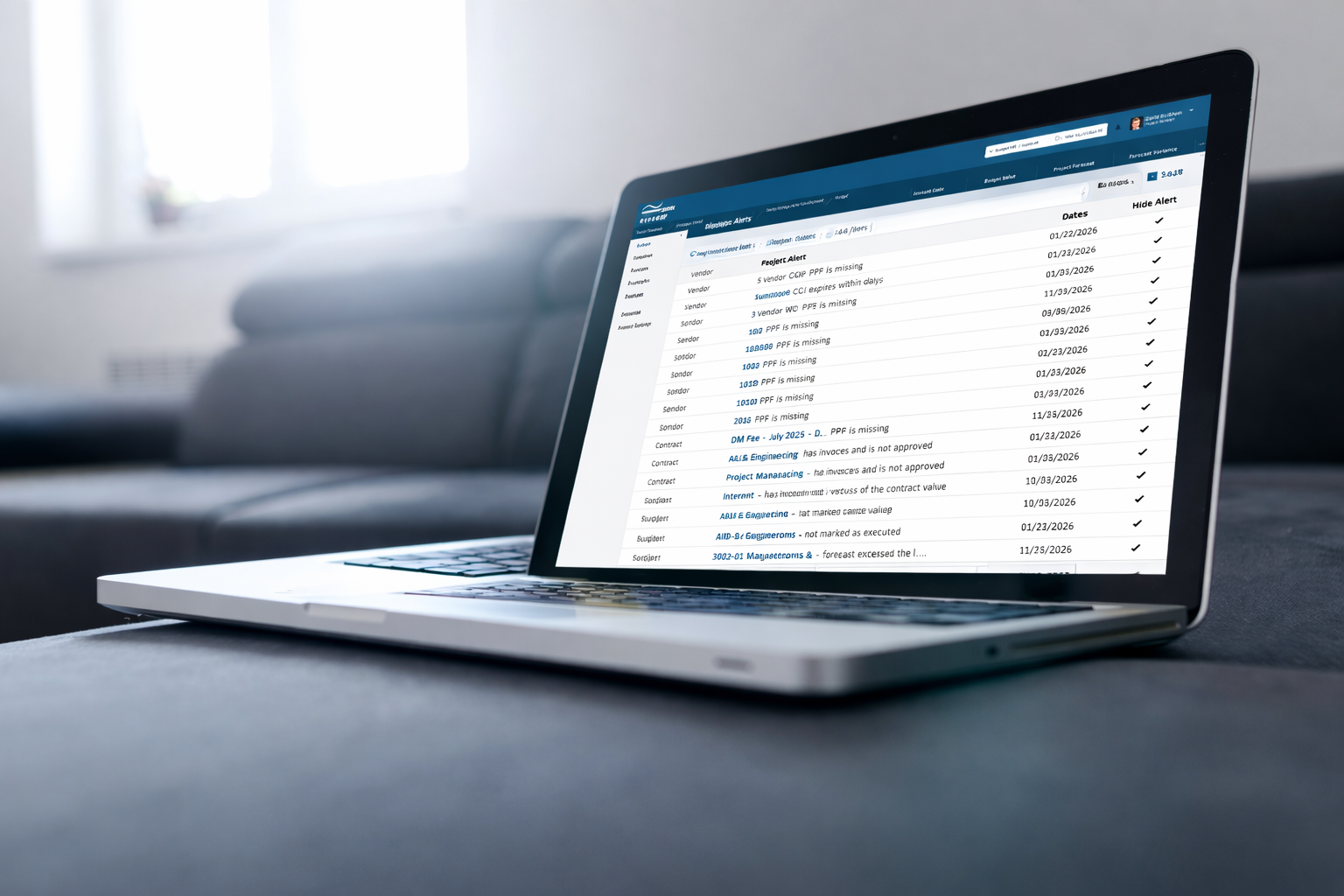
When COIs are missing, expiring soon, or expired, Rivur creates project-level alerts that surface on your dashboard and route users back to the exact project vendor list to resolve the issue.
Key capabilities
-
COI tracking by vendor and project
Upload a COI PDF directly on the vendor assignment for a project, and record the expiration date. This keeps compliance tied to where the work is happening.
-
Project-level insurance requirements
Optionally attach an insurance requirements document at the project level, so vendors see exactly what is required for that project.
-

COI required controls
Set whether a COI is required at the project level, so compliance expectations are clear and consistent.
-

Proactive expiration monitoring
Rivur schedules an automated “expiring soon” workflow 45 days before the COI expiration date. Users receive in-app activity notifications and optional email reminders based on role preferences.
-

Dashboard visibility
COI alerts appear in the Alerts area of the dashboard with filters for: COI missing, COI expires soon, and COI expired
-

Draw and invoice compliance
COI status is not just tracked; it is enforced. COI checks are included in draw compliance, and missing COIs can block invoice submission when lien waiver requirements apply, so you catch issues before they slow funding.
How it works
Assign a vendor to a project
Upload the COI PDF, and set the expiration date
Rivur automatically monitors COI status and creates project-level alerts
45 days before expiration, Rivur triggers in-app notifications and optional emails
COI status is checked during draw compliance, and can be required for invoice submission depending on contract rules

Why it matters
Reduce risk by preventing expired vendor insurance from slipping through
Cut down manual follow-up, spreadsheets, and email chains
Keep invoices and draw packages moving without compliance surprises
Avoid paying for standalone COI tracking software, because it is included in Rivur
COI FAQs
-
A Certificate of Insurance, or COI, is a document that summarizes a vendor’s insurance coverage, like general liability, workers’ compensation, auto liability, umbrella coverage, and additional insured status, for a specific period of time.
-
COIs help reduce risk by confirming a vendor has active insurance coverage that meets your requirements before they start work, access a site, or invoice for payment.
-
Most teams look for the insured name, carrier, policy numbers, effective dates, expiration dates, coverage limits, and any required endorsements such as additional insured, waiver of subrogation, and primary and non-contributory language, if applicable.
-
A COI is a summary document. An endorsement is part of the insurance policy and is often required to prove specific terms, like additional insured status. Some organizations accept a COI alone, while others require endorsements for higher-risk work.
-
COIs should remain current for the entire period the vendor performs work. Many COIs renew annually, but some policies can change mid-year. A practical rule is to require an updated COI before the current one expires, and to re-verify after renewals or scope changes.
-
Additional insured means your organization is added to the vendor’s policy for certain claims arising from the vendor’s work. It can help protect you if a claim is connected to the vendor’s operations on your property or project.
-
A waiver of subrogation limits an insurer’s ability to pursue recovery from another party after paying a claim. Many owners and GCs require it to reduce legal disputes among parties after an incident.
-
It generally means the vendor’s insurance responds first to covered claims arising out of the vendor’s work, without requiring contribution from your own insurance, subject to policy terms and endorsements.
-
Requirements vary by risk, but common categories include general liability, workers’ compensation, auto liability, and umbrella coverage, with specified minimum limits. Higher-risk trades often require higher limits and specific endorsements.
-
Many teams track COIs by vendor and project because requirements can differ by property, project, scope of work, and contract. The same vendor may be compliant for one project but not for another if coverage limits or endorsements differ.
-
A common approach is 30 to 60 days before expiration. That window gives vendors time to request renewals from their broker, and it gives you time to review coverage before work or invoicing is impacted.
-
Common issues include relying on spreadsheets and email, missing expiration dates, accepting COIs that do not match the required insured name or endorsements, inconsistent requirements across projects, and letting invoices proceed before compliance is confirmed.
-
It can create liability risk, delay site access, stall invoice approvals, and, in some cases, prevent payment depending on contract terms and internal controls.
-
A COI is helpful, but it is not the insurance policy itself. For certain requirements, like additional insured status, owners often request endorsements or policy language to confirm the term is actually in force.
-
Best practice is to store COIs centrally, tie them to the vendor and the specific property or project, and keep expiration dates and key coverage details searchable, so teams can resolve issues quickly.
-
COI tracking software helps collect COIs, store documents, track expiration dates, and notify teams about missing or expiring coverage. Teams typically need it once they have enough vendors, properties, or projects that spreadsheets become unreliable.
-
Yes, and that is why many organizations track COIs at the project level and publish project-specific insurance requirements.
-
Yes. Many teams require COI compliance before invoices are approved or paid, especially on higher-risk scopes of work.